DaVinci Resolve Simplified
Learn how to edit in a day.
Learn DaVinci Resolve from scratch with a simple, repeatable editing workflow — plus my ready-made project template, workspace layouts and one-press shortcuts to help you edit faster.
30-day money-back guarantee · Instant access
Does Any of This
Sound Familiar?
You open DaVinci Resolve and immediately feel overwhelmed
The interface looks like a spaceship cockpit. You close it. Again.
You’ve watched hours of YouTube tutorials and still feel lost
You’ve picked up scattered tips, but you still don’t have a complete, repeatable workflow.
Your editing takes forever because you’ve got no clear system
Every edit starts from scratch. You’re clicking around hoping something works.
Other people finish edits in hours. Yours takes days.
You’re losing time on every single project — and you know it.
Introducing: DaVinci Resolve Simplified
You don’t need to master the entire software. You need a clear path through the parts that matter — with the setup and tools to help you edit faster.
- ✓ A simplified Resolve setup that removes the clutter
- ✓ A repeatable workflow that takes every project from footage to finished video
- ✓ Ready-made project template, layouts and one-press shortcuts
- ✓ Watch Me Edit lessons with real-time commentary
Full access for $147 USD — one payment, lifetime access, and future updates included.
Hey, I'm Ben.
And I edit fast.
I’ve been creating and editing videos for nearly 20 years, and I’ve built an audience of 300K YouTube subscribers by making complicated video topics easier to understand.
I’ve helped complete beginners, 360 camera users, travel filmmakers, and aspiring professionals finally feel confident inside DaVinci Resolve.
The one thing they usually say afterwards? They wish they’d found me sooner.

300K
YouTube subscribers
20 Years
Creating and editing videos
6M+ Views
On my DaVinci Resolve tutorials
Everything Inside
DaVinci Resolve Simplified
Follow the exact workflow Ben uses on real edits, then put it into practice with guided edit-alongs and ready-to-use editing tools.
The Simplified Lessons
Workflow Simplified
The 3 key editing stages that turn hours of raw footage into a finished video — in the right order, every time.
User Interface Simplified
Set up Resolve to look and feel like a simple editor — remove the overwhelm before you cut a single clip.
Editing Simplified
Cut footage faster using the essential shortcuts Ben relies on every single day — no wasted clicks.
B-Roll Simplified
Add visual layers that make your edit flow — footage, graphics, markers and transitions without the mess.
Effects Simplified — Part 1
Make shots more dynamic with simple movement — reframing and keyframing without guesswork.
Effects Simplified — Part 2
Create split screens, speed effects and faster adjustments — the techniques that make edits look professional.
Text Simplified
Create titles that look good and save time — using Ben's own templates so you're never starting from scratch.
Audio Simplified
Balance dialogue, music and sound effects so your video sounds as good as it looks.
Colour Simplified
Make your footage look better in minutes using Ben's own colour presets — cinematic results without a colour science degree.
Final Adjustments Simplified
Take your edit from 90% to complete — the finishing moves that separate a draft from a video you're proud to publish.
Exporting Simplified
Export fast without complicated settings — the right format, the right quality, every time, in under two minutes.
5 x Watch Me Edit Bonus Videos
See the workflow in action
Watch over Ben’s shoulder as he edits real projects
Follow along as Ben works through real edits in real time — showing the decisions, shortcuts, pacing choices and practical adjustments that most tutorials skip.
Included Bonus Downloads
Master Project Template
Start every edit with the timeline, folders, bins and structure already set up — so you’re not building from scratch every time.
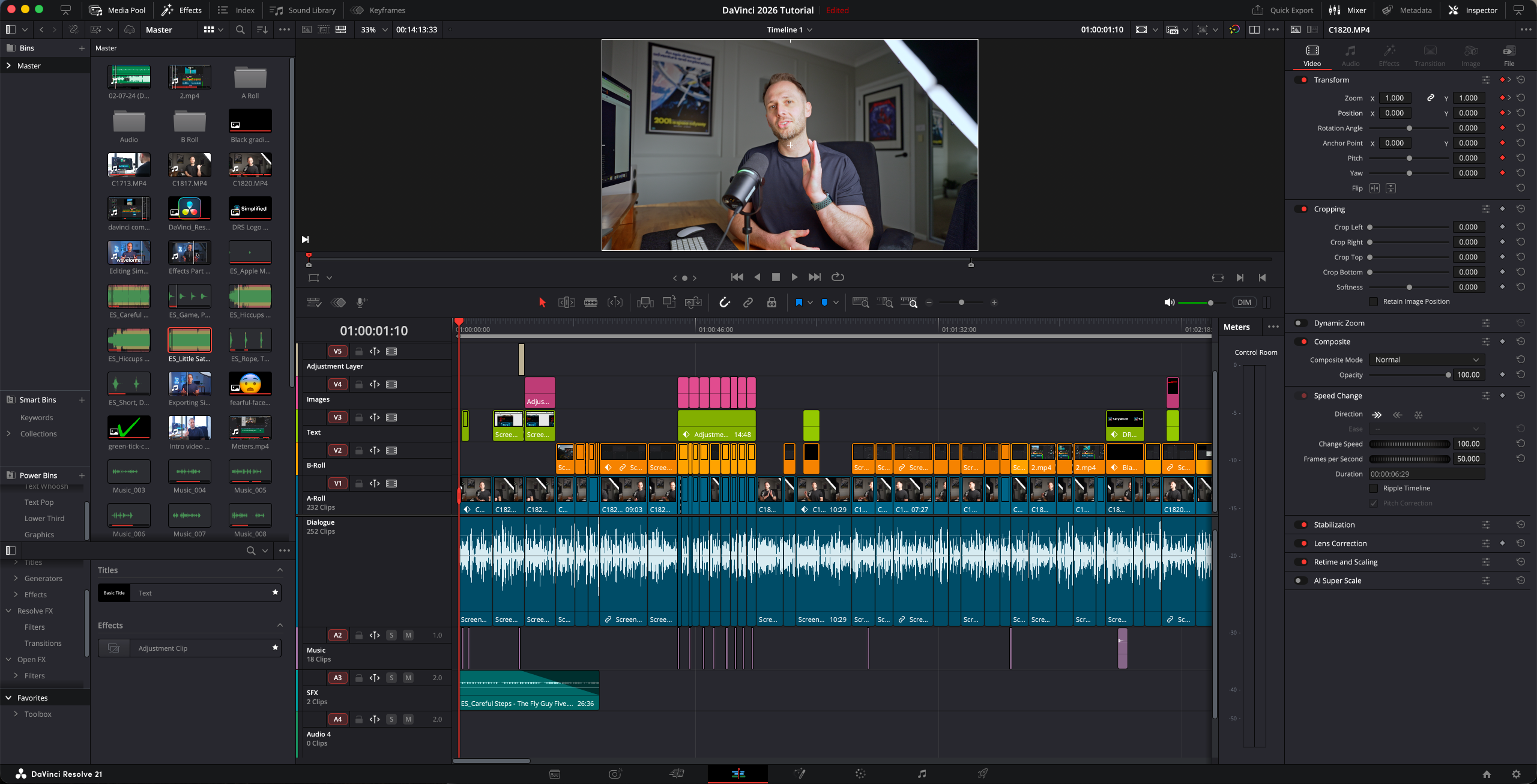
Workspace Layouts
Import Ben’s simplified DaVinci Resolve layouts so the interface feels cleaner, calmer and easier to follow.
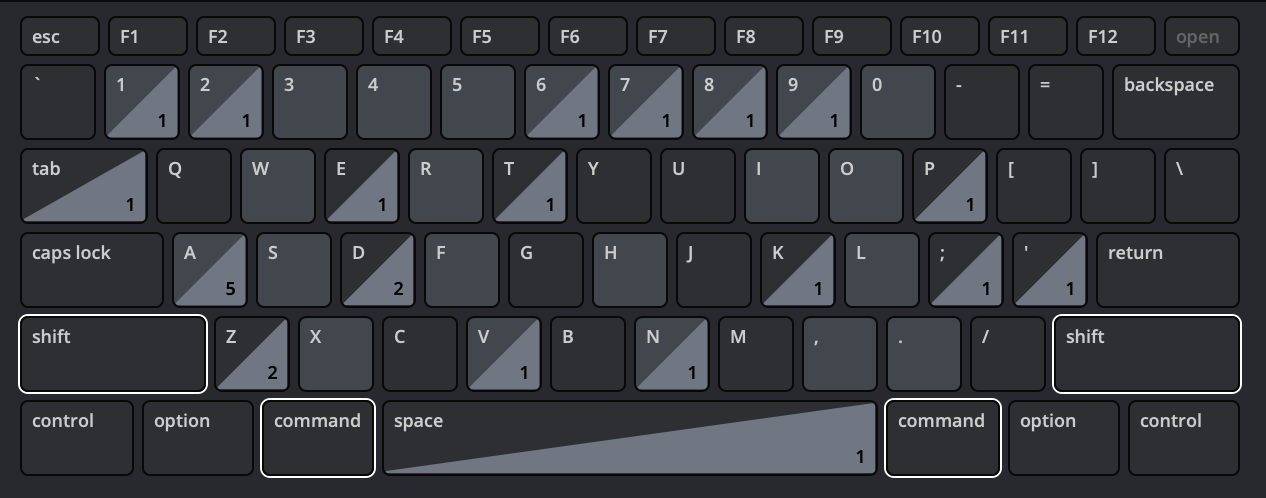
Keyboard Shortcuts File + Written Guide
Use Ben’s one-press editing shortcuts to cut faster, reduce clicking and follow along with the course more easily.
See What
Students Are Saying
DaVinci Resolve Simplified Students
“Before this course, I was constantly going back to YouTube for the basics. Ben’s guidance and tools have saved me a lot of time. I now have two videos published on YouTube and feel confident sharing them with the public.”
Ken Thompson
DaVinci Resolve Simplified student
“My biggest obstacle was finding a solid base to work from — I had a chaotic workflow. The course taught me to stick to a workflow and helped expand my knowledge of better editing practices.”
Curtis Yacboski
DaVinci Resolve Simplified student
“Resolve initially felt like a space shuttle cockpit. I now understand the major steps of editing and have started using Ben’s recommended shortcuts. I recommend this guide — it’s really useful.”
Dmitrij Kuzmin
DaVinci Resolve Simplified student
What Beginners Say About Ben’s Free Teaching
“Coming from iMovie, I was so overwhelmed with all the features DaVinci has to offer. Thanks for your tutorial — I wish I had found it earlier.”
@immerweiterraus
iMovie → DaVinci · 1,800 likes
“I was a CapCut editor, and everything in DaVinci overwhelmed me. I had thoughts of switching back to CapCut, but this tutorial helped me a lot.”
@ruikvz
CapCut → DaVinci · 1,300 likes
“I learned more about the software in your 12 minutes than I did in days spent stumbling through other YouTube videos.”
@WindlePoones
DaVinci Resolve beginner
Course feedback and YouTube comments have been lightly edited for length, spelling and clarity without changing their meaning. YouTube comments sourced from Ben’s DaVinci Resolve tutorial.
Learn How To Edit In Just One Day.
Everything Included for One Payment.
Get instant access to the full course, bonus lessons, downloadable assets and future updates — with no subscriptions or recurring fees.
What's Included
Everything you need to learn the workflow, simplify Resolve and start editing faster.
DaVinci Resolve Simplified — Full Course
11 focused core lessons, every one under 20 minutes
5 Watch Me Edit Bonus Lessons
Watch real edits come together from start to finish
Ben's Personal Editing Bundle
Master project template, workspace layouts, shortcuts file and written guide
Lifetime Access + Future Updates
Yours forever, including anything added later
One Payment · Lifetime Access
$147
USD
Normally $197 USD
New student offer · Save $50
✓ Works with the free version of Resolve
Instant access · 30-day guarantee · Lifetime updates
Try the complete course for 30 days
Use the lessons, templates and shortcuts on a real edit. If the course doesn’t make DaVinci Resolve feel simpler and easier to use, contact me for a full refund.
Got Questions?
Start Here.
A few quick answers before you jump into DaVinci Resolve Simplified.
The free tutorial gives you a strong introduction and helps you complete your first edit. DaVinci Resolve Simplified gives you a structured workflow you can reuse on every project, with 11 focused core lessons, five Watch Me Edit lessons, a master project template, workspace layouts and one-press shortcuts. It gives you one complete system to follow whenever you edit.
Both versions can be used, but you can follow the course 100% with the free version of DaVinci Resolve. You don’t need to purchase the Studio version to follow the lessons or use the workflow.
The course was created for DaVinci Resolve 21. It focuses on the core workflow and tools that remain consistent between versions, rather than minor features that regularly move or change.
The course focuses on editing traditional videos inside DaVinci Resolve rather than editing 360 video directly. For 360 footage, export your reframed shots from Insta360 Studio and import them into Resolve as B-roll. That’s the same workflow I use for my YouTube videos.
Ready to start editing faster?
Get the complete course, five Watch Me Edit lessons and Ben’s practical editing toolkit with lifetime access.
Get Instant Access for $147One payment · 30-day guarantee · Works with free Resolve